
Microsoft Copilot for Business: The Ultimate Guide to Implementation & ROI
The buzz around AI in the workplace is undeniable, but for many UK businesses, so is the confusion. You’ve heard the promises of revolutionary productivity, but you’re facing real questions. Is our company data truly secure? How can we justify the £25 per user monthly cost and prove the return on investment? And critically, how do we integrate a tool like Microsoft’s Co-pilot for Business without overwhelming our team and disrupting workflow?
This is not just another tech trend; it’s a fundamental shift in how work gets done. Consider this guide your definitive, jargon-free answer. We will cut through the noise to provide a clear, practical roadmap for a successful deployment. You will discover exactly what Copilot for Business is, how to implement it securely, and the proven strategies to train your staff effectively. Welcome to a new era of efficiency. Let’s unlock its potential and turn your investment into a tangible competitive advantage.
Key Takeaways
- Grasp the critical difference between the standard Copilot and the enterprise-grade security of Copilot for Microsoft 365 to make the right investment for your business.
- Discover actionable, department-specific use cases that move beyond theory to drive tangible productivity and efficiency gains across your organisation.
- Follow a strategic implementation roadmap that ensures your co pilot rollout is both seamless and secure, addressing critical data privacy questions from the outset.
- Understand how partnering with an expert navigates the complexities of licensing, data preparation, and training to maximise your return on investment.
Demystifying Microsoft Copilot: What It Is (and Isn’t) for Your Business
At its core, Microsoft Copilot is an AI-powered assistant designed to function as your intelligent partner within the Microsoft 365 ecosystem. Think of it not as a standalone chatbot, but as a powerful reasoning engine seamlessly integrated into the apps you use daily-like Teams, Outlook, and Excel. For a detailed technical background, a comprehensive Microsoft Copilot overview is available, but for business leaders, the critical takeaway is this: it combines the power of large language models (LLMs) with your organisation’s own data to deliver relevant, contextual assistance.
Many ask if it’s just ChatGPT with a Microsoft logo. The answer is a definitive no. While it uses similar underlying AI technology, its true value lies in its secure access to your business context, transforming it from a general-knowledge tool into a bespoke productivity engine.
Copilot vs. Copilot for Microsoft 365: Key Business Differences
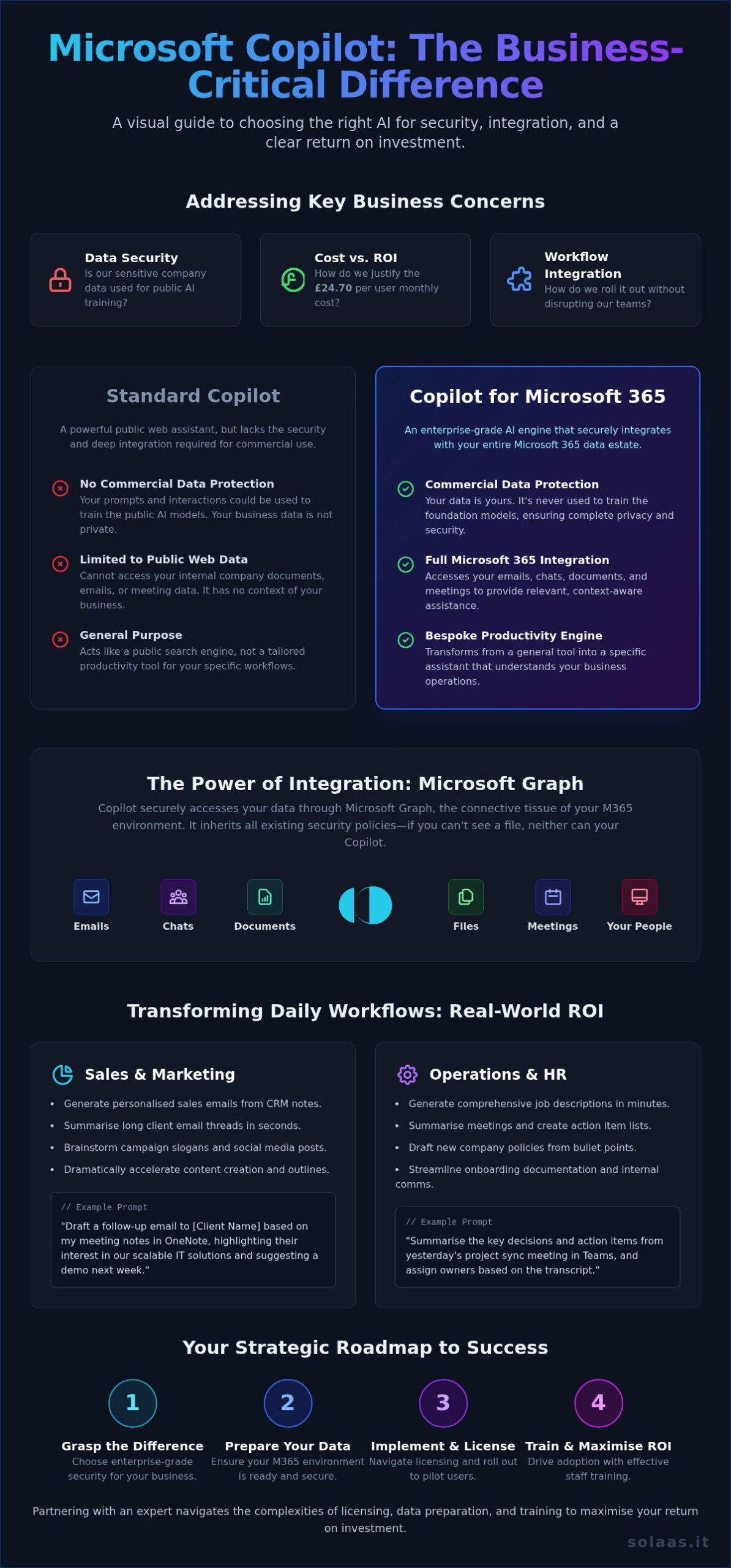
Understanding the distinction between the free and paid versions is crucial for any business. The free version of Copilot is a capable tool for searching the public web, but it lacks the security and integration necessary for commercial use. The business-grade solution, Copilot for Microsoft 365, is a different class of service entirely.
- Commercial Data Protection: Your prompts and business data are not used to train the underlying AI models, ensuring your sensitive information remains private.
- Microsoft 365 Integration: It works across your entire data estate-emails, chats, documents, and meetings.
- Pricing and Audience: Designed for business, it is available as an add-on for Microsoft 365 Business and Enterprise plans, priced at £24.70 per user, per month in the UK.
How Copilot Accesses Your Data: The Microsoft Graph Explained
The “magic” behind this business integration is the Microsoft Graph. Imagine it as a secure, intelligent network mapping the relationships between people, content, and activities across your Microsoft 365 tenancy. This is not a separate database; it’s the connective tissue that allows this powerful co pilot to access your emails, files, and meetings. Crucially, it inherits and respects all existing security policies and user permissions. If an employee doesn’t have access to a specific SharePoint folder, neither does their Copilot.
Beyond ChatGPT: Unique Copilot Integrations
This deep integration is what sets Copilot for Microsoft 365 apart. A public AI tool has no context of your business operations. In contrast, Copilot can perform tasks that are uniquely valuable to your workflow. You can ask it to “summarise the action points from yesterday’s project meeting in Teams” or “draft a response to this client email in Outlook using data from the attached Excel sheet.” It combines the LLM’s reasoning with your live, secure business data to provide a truly tailored and productive experience.
Real-World Business Use Cases: Transforming Daily Workflows
To truly understand the value of Microsoft 365 Copilot, we must move beyond abstract benefits and look at its practical impact on daily tasks. This AI assistant integrates directly into the Microsoft 365 apps your teams use every day, acting as a powerful productivity engine that unlocks efficiency by understanding context from your documents, emails, and meetings. Crucially, it operates within your existing security and compliance boundaries, leveraging the principles detailed in Microsoft’s Security Copilot Architecture to ensure your data remains your own.
For Sales & Marketing Teams
Your commercial teams can reclaim hours spent on administrative tasks. Instead of manually drafting outreach, they can use Copilot to generate personalised sales emails directly from CRM notes and past conversations. It can summarise lengthy client email threads in seconds, ensuring no detail is missed. For marketers, it’s an invaluable creative partner for brainstorming campaign slogans, social media posts, and blog outlines, dramatically accelerating content creation.
Example Prompt: “Draft a follow-up email to [Client Name] based on my meeting notes in OneNote, highlighting their interest in our scalable IT solutions and suggesting a demo next week.”
For Operations & HR
From recruitment to internal policy, this co pilot streamlines core business functions. HR can generate comprehensive job descriptions and tailored interview questions in minutes, not hours. For operations, it transforms meeting productivity by summarising discussions and automatically creating a list of action items with assigned owners. Drafting internal communications or new company policies becomes as simple as providing a few bullet points and letting Copilot handle the professional formatting and tone.
Example Prompt: “Summarise the key themes and action items from the Q3 project review meeting transcript and assign owners.”
For Finance & Leadership
For senior leaders and finance professionals, Copilot provides a direct path to clearer insights and faster decision-making. It can digest a 50-page financial report and provide a one-page executive summary in Word. An entire board-level presentation can be created in PowerPoint simply by feeding it an outline. In Excel, leaders can use natural language to ask, “What were our top 3 revenue streams last quarter?” and have Copilot instantly generate the relevant charts and analysis.
Example Prompt: “Create a 10-slide PowerPoint presentation from the attached Q4 financial report, focusing on revenue growth and cost-saving initiatives.”
Security & Data Privacy: Answering Your Toughest Questions
For any business leader, the promise of AI is immediately followed by a critical question: is our data safe? With Microsoft 365 Copilot, the answer is an emphatic yes. Microsoft has engineered its AI solutions with an enterprise-grade security framework at their core, building on the trusted foundation of Microsoft 365 that thousands of UK businesses already rely on. This isn’t consumer AI retrofitted for business; it’s a secure, compliant, and powerful tool designed for the modern workplace.
How Copilot Protects Your Sensitive Company Data
Copilot operates exclusively within your organisation’s secure environment, a concept Microsoft calls your ‘tenant boundary’. Think of it as a digital fortress; your data, prompts, and the AI’s responses never leave this protected space. Crucially, your company’s information is never used to train the underlying large language models (LLMs) that power Copilot. Your data remains your data.
Furthermore, this powerful co pilot inherits the security you already have in place:
- Inherited Policies: It automatically respects all your existing Microsoft 365 security, compliance, and privacy policies. If a user doesn’t have permission to access a file, neither does Copilot on their behalf.
- Sensitivity Labels: It recognises and honours sensitivity labels on documents, ensuring confidential data is handled appropriately.
- Robust Encryption: All data is fully encrypted, both in transit and at rest, meeting comprehensive enterprise compliance standards.
Essential Data Governance Before You Deploy
The effectiveness and security of Copilot hinge on a simple principle: ‘garbage in, garbage out’. The AI can only work with the data it can access, and it only has the access rights of the user prompting it. If your data permissions are disorganised, Copilot could inadvertently surface sensitive information to a user who technically had access but was unaware of it. Before deployment, it is vital to get your digital house in order by reviewing SharePoint and OneDrive permissions to ensure data is properly siloed.
Meeting UK GDPR and Compliance Requirements
Microsoft is deeply committed to data protection, and Copilot is designed to meet stringent regulatory requirements, including the UK GDPR. All data processing for UK customers occurs within compliant data centres, ensuring your information is handled in accordance with local laws. As outlined in the official Microsoft 365 Copilot for Business resources, the platform supports GDPR principles like data minimisation and provides tools to help you manage Data Subject Access Requests (DSARs) efficiently.
Putting the right governance in place is the first step to a successful and secure AI deployment. Need help with a data security audit? We can help.
A Strategic Roadmap for Successful Copilot Implementation
Unlocking the full potential of Microsoft 365 Copilot requires more than just purchasing licenses; it demands a strategic, people-centric approach. A successful rollout transforms this powerful AI tool from a novel concept into an integral component of your daily operations, driving real productivity gains. As your trusted partner, SolaaS provides a tailored roadmap to ensure your investment delivers maximum impact. Our phased framework is designed for seamless integration and widespread user adoption.
Phase 1: Readiness Assessment & Licensing
The first step is ensuring your technical and organisational foundations are solid. This involves confirming you have the necessary prerequisite licenses, such as Microsoft 365 Business Standard/Premium, E3, or E5. The co pilot license itself is a straightforward add-on, priced in the UK at £24.70 per user, per month. We help you select the right users for an initial pilot-focusing on roles across different departments that stand to gain the most. Crucially, this phase revisits the data governance and security protocols mentioned earlier, guaranteeing your information is secure and structured for optimal AI performance.
Phase 2: The Pilot Program & Early Wins
Starting with a controlled pilot program is key to building momentum. We recommend beginning with a small, enthusiastic group who can provide constructive feedback and champion the technology. Together, we will establish clear goals and KPIs for the pilot, such as measuring time saved on routine tasks or the quality of AI-assisted content creation. The insights gathered here are invaluable for building a compelling business case for a wider rollout and identifying your internal ‘Copilot Champions’-advocates who will help inspire and guide their colleagues.
Phase 3: Full Rollout & User Adoption
With a successful pilot complete, the focus shifts to a full, structured deployment. Lasting success hinges on user adoption, which we support with a comprehensive training plan tailored to your teams’ unique workflows. We provide essential resources, including prompt engineering guides and best-practice documents, to help your staff master the art of collaborating with their new AI assistant. A robust communication plan shares early wins and practical tips, while a continuous feedback loop allows us to refine usage and ensure the tool evolves with your business needs.
Navigating this journey ensures your team doesn’t just use Copilot-they excel with it. For expert guidance on your implementation strategy, contact the SolaaS team today.
Why Partner with an MSP for Your Copilot Rollout?
Microsoft 365 Copilot is a genuinely transformative tool, but unlocking its full potential requires more than just a subscription. The path to successful adoption is complex, involving intricate licensing, rigorous security preparations, and effective user training. Partnering with a specialist Managed Service Provider (MSP) like SolaaS transforms this challenge into a strategic advantage, ensuring you maximise your investment and achieve a faster, more significant return.
We provide the expert guidance needed to navigate the technical and organisational changes, turning a powerful piece of technology into a cornerstone of your business productivity.
Navigate Complex Microsoft Licensing
Microsoft’s licensing landscape can be a minefield. The prerequisites for Copilot are specific, and choosing the wrong plan can lead to significant and unnecessary costs. As your trusted partner, we provide a tailored solution that cuts through the complexity.
- Ensure Prerequisites: We verify you have the correct base licences (e.g., Microsoft 365 E3/E5) in place before you invest.
- Optimise for Cost: We analyse your usage needs to recommend the most cost-effective licensing model, ensuring every pound is well spent.
- Avoid Overspending: Our experts help you avoid paying for features your team won’t use, optimising your overall IT budget.
Ensure a Secure & Compliant Deployment
Introducing a powerful AI into your environment demands a security-first approach. Without proper data governance and access controls, you risk exposing sensitive information. Our team ensures your co pilot deployment is not only powerful but also secure and compliant with UK GDPR and data protection regulations from day one.
- Conduct Pre-Deployment Audits: We assess your current data security posture and SharePoint permissions to identify and remediate risks.
- Configure for Compliance: We configure Copilot’s settings and data sensitivity labels to align perfectly with your internal business policies.
- Stay Ahead of Threats: We provide ongoing management to keep your deployment aligned with evolving security best practices.
Accelerate ROI with Expert Training & Support
Technology is only valuable when your team uses it effectively. To achieve a tangible return on your Copilot investment, user adoption is critical. We go beyond generic guides to provide a comprehensive training programme that drives real-world productivity gains and empowers your team.
- Tailored Training: We deliver custom training sessions focused on your specific business workflows and high-value use cases.
- Ongoing Support: Our UK-based team provides continuous support, acting as a dedicated resource for your employees as they adapt.
- Measure for Success: We help you establish key metrics to measure the impact of Copilot and build on your success over time.
Don’t let complexity hinder your progress. A strategic partnership with SolaaS provides the expertise and support needed for a seamless and successful Microsoft 365 Copilot rollout. Ready to unlock the full potential of AI for your business? Book your Copilot readiness assessment with SolaaS today.
Your Strategic Partner for a Successful Copilot Implementation
Microsoft Copilot is far more than an AI assistant; it’s a strategic catalyst for unprecedented productivity and innovation. As we’ve explored, realising its full potential hinges on a strategic implementation-one that bypasses common pitfalls by prioritising your unique security needs, ensuring seamless user adoption, and is meticulously aligned with your business objectives.
Navigating the complexities of a successful co pilot deployment requires more than just technical skill; it demands strategic foresight. As a Certified Microsoft Solutions Partner, SolaaS provides the expert guidance you need. Our deep expertise in UK Data Protection & GDPR ensures your rollout is not only powerful but also fully compliant, with tailored IT strategies designed to maximise your ROI and accelerate your business growth.
Ready to transform your business with AI? Schedule a free Copilot readiness assessment with a SolaaS expert.
Let us be your trusted partner in navigating this new era of business intelligence. The future of work is here, and with the right strategy, your team will be leading the charge.
Frequently Asked Questions About Microsoft 365 Copilot
How much does Microsoft Copilot for Business cost in the UK?
In the United Kingdom, the Microsoft 365 Copilot add-on is priced at £24.70 per user, per month (excluding VAT), typically billed as an annual commitment. This investment is designed to unlock significant productivity gains across your organisation. By automating routine tasks and enhancing creative processes, Copilot delivers a powerful return, making it a cost-effective solution for businesses aiming to empower their teams and drive efficiency.
What are the minimum license requirements to use Copilot for Microsoft 365?
To enable Copilot, each user must have an existing, prerequisite Microsoft 365 license. The compatible base plans are Microsoft 365 Business Standard, Business Premium, E3, or E5. This add-on structure ensures a seamless integration into your current IT ecosystem. It allows your business to build upon its existing Microsoft investment, unlocking a new level of AI-powered capability without needing to overhaul your core software subscriptions.
Can Copilot access data from third-party apps outside of Microsoft 365?
Yes, Copilot can securely access and reason over data from many popular third-party applications. This is made possible through Microsoft Graph connectors, which can index information from external platforms like Salesforce, Jira, or Confluence. By integrating these data sources, Copilot provides more comprehensive and contextually relevant answers, transforming it into a centralised intelligence tool that operates across your entire technology stack.
How long does it typically take to implement Copilot across a small business?
The technical deployment of Copilot for a small business is typically very fast, often completed within a few days. The more important phase is user adoption and training, which can take several weeks to gain meaningful traction. A successful rollout focuses on identifying high-impact use cases and providing tailored guidance, ensuring your team can confidently leverage this powerful co pilot to enhance their daily workflows and maximise its value.
What is the difference between Copilot in Teams, Outlook, and Excel?
Copilot’s functionality is uniquely tailored to each application. In Microsoft Teams, it acts as your meeting assistant, summarising discussions and creating action item lists. In Outlook, it helps you draft professional emails, adjust their tone, and condense long threads. Within Excel, Copilot becomes a data analyst, generating formulas, creating charts, and identifying key insights from your data based on natural language prompts.
Will our private business data be used to train the public AI model?
No, your business data is completely secure and is never used to train the public large language models (LLMs) that power Copilot. Your company’s information-including documents, emails, and chats-remains protected within your own Microsoft 365 tenant. Copilot processes your data in real-time to provide relevant assistance but does not retain it for public model training, ensuring your commercial information remains confidential.
How do we measure the return on investment (ROI) of Copilot?
Measuring the ROI of Copilot involves assessing both quantitative time savings and qualitative improvements. You can track efficiency gains by calculating hours saved on tasks like summarising meetings, drafting reports, or analysing data. Additionally, you can survey employees on their perceived productivity, the quality of their work, and overall job satisfaction to capture the full impact this intelligent co pilot has on your business operations.

Article by
René Wheeler
René Wheeler is Managing Director of SolaaS, bringing over three decades of experience in IT and telecoms. He is a strong advocate for transparency and flexibility, championing monthly contract models that allow businesses to stay agile and in control of their technology. His approach challenges traditional industry practices and puts client outcomes first