
What Is a Trojan Horse Virus? A Guide for UK Businesses
Is your business computer suddenly running slow, or are you seeing unexpected pop-ups and changes you can’t explain? These unsettling signs are often the first indication that your security has been breached. For many UK businesses, the culprit is a deceptive and highly dangerous piece of malware known as a trojan horse virus, designed to look like a legitimate program while hiding its malicious intent deep within your systems.
Understanding the ever-growing list of cyber threats can feel overwhelming, but ignoring the risk is not an option when your company’s sensitive data, client information, and financial stability are on the line. This guide is designed to empower you with clarity and control, putting the reins of your digital security firmly back in your hands.
Here, you will find a comprehensive breakdown of what Trojan viruses are, the cunning ways they infiltrate business networks, and the essential, actionable steps you can take to protect your company. We’ll provide the expert solutions you need to identify, remove, and build a robust defence against this persistent cyber threat, securing your business for the future.
Key Takeaways
- Understand the deceptive nature of a trojan horse virus, which masquerades as legitimate software to gain access to your critical business data.
- Identify the common entry points for Trojans, from malicious email attachments to deceptive software downloads, to better secure your daily operations.
- Discover the different categories of Trojans and the specific commercial risks they pose to UK businesses, from data theft to complete system lockdown.
- Learn how to build a multi-layered, proactive defence strategy, positioning prevention as the most effective and cost-efficient solution against cyber threats.
What Is a Trojan Horse Virus? The Deception Explained
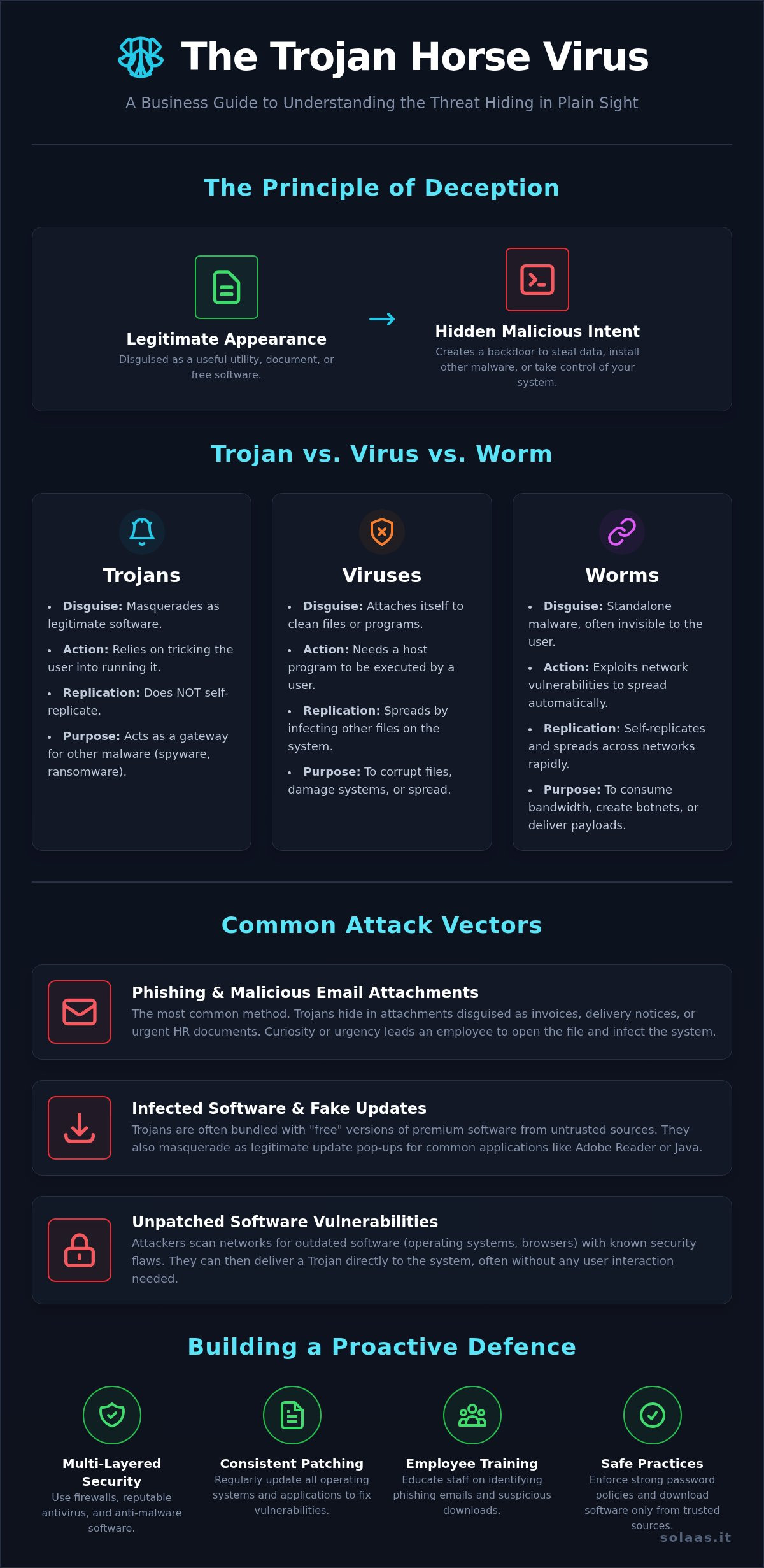
Much like the legendary wooden horse used by the Greeks to conquer Troy, a trojan horse virus operates on a simple yet powerful principle: deception. It is a type of malicious code or software that appears legitimate but is designed to create a backdoor into your system, granting cybercriminals unauthorised access. You might download it thinking it’s a useful utility, a free game, or an important document, only to find you’ve invited a significant threat onto your network.
The primary goal of a Trojan is not to replicate itself, which is a key difference from a traditional virus. Instead, it acts as a delivery mechanism. Once inside your system, it can download and install other forms of malware, such as spyware, ransomware, or keyloggers, without your knowledge. In the world of cybersecurity, this type of threat, formally known as a Trojan horse (computing), relies entirely on tricking the user into running it, effectively opening the gates from the inside.
Why is it called a ‘Trojan Horse’?
The name comes directly from the ancient Greek story of the Trojan War. After a long siege, the Greeks pretended to sail away, leaving behind a giant wooden horse as a supposed offering. The Trojans, celebrating their apparent victory, pulled the horse inside their city walls. That night, Greek soldiers hidden inside emerged, opened the gates for their army, and the city was destroyed. The malware works in the same way: the software you willingly invite in carries a hidden, malicious payload.
Trojan vs. Virus vs. Worm: The Key Differences
Understanding the distinctions between common malware types is crucial for effective cybersecurity. While often used interchangeably, these threats operate very differently:
- Trojans: Disguise themselves as legitimate software to trick users into installing them. They do not self-replicate and act as a gateway for other malware.
- Viruses: Attach themselves to clean files and need a host programme to run. They spread when a user shares or runs the infected file, infecting other files in the process.
- Worms: Are standalone malware that can self-replicate and spread across networks automatically by exploiting security vulnerabilities, often without any human interaction at all.
How Trojans Infiltrate Business Systems: Common Attack Vectors
Unlike viruses that can self-replicate, a Trojan horse virus relies on deception to gain entry. Cybercriminals are experts in social engineering, manipulating human psychology to trick employees into willingly installing the malware. This is the critical vulnerability for many UK businesses; a single, well-disguised email or a moment of carelessness from one team member can provide the foothold needed to compromise your entire network infrastructure.
Understanding these entry points is the first step toward building a robust defence. The most effective Trojans are masters of disguise, hiding within the everyday digital traffic of a busy organisation.
Phishing and Malicious Email Attachments
This is the most common delivery method. An employee receives an email that looks legitimate-perhaps a PDF invoice from a supposed supplier, a delivery notice from Royal Mail, or an urgent document from “HR.” The attachment itself contains the Trojan. Opening a Word document and enabling macros, for instance, can execute the malicious code, giving attackers a backdoor into your system. These campaigns are designed to create a sense of urgency or curiosity to bypass critical thinking.
Infected Software Downloads and Fake Updates
The temptation of free software can be a significant risk. Employees might download a supposedly “free” version of a premium tool from an untrusted website, only to find it bundled with a Trojan. Another common tactic involves fake update pop-ups for ubiquitous software like Adobe Reader or Java. The deceptive nature of a trojan horse virus, as explained by Fortinet, means it often masquerades as something desirable or necessary, making these fake updates highly effective.
Exploiting Unpatched Software Vulnerabilities
While many Trojans require user interaction, some can exploit existing security flaws in your software. Attackers constantly scan networks for systems running outdated versions of operating systems, web browsers, or other applications with known vulnerabilities. If a weakness is found, they can use an exploit kit to deliver a Trojan directly to the system, often without the user needing to click anything. This highlights the non-negotiable importance of consistent and comprehensive patch management.
The Most Dangerous Types of Trojans Targeting Businesses
Not all malware is created equal, and the same is true for the trojan horse virus. While any infiltration is a threat, certain types are engineered specifically to cripple business operations, steal critical data, and inflict maximum financial damage. Understanding these categories is the first step toward building a robust defence. For a deeper technical dive, this authoritative guide to Trojan horses from Fortinet categorises them by their destructive capabilities, which we will explore from a business-impact perspective below.
Backdoor Trojans: The Keys to Your Kingdom
Imagine handing a cybercriminal a master key to your entire IT infrastructure. That’s precisely what a backdoor Trojan does. It creates a hidden, remote-access channel that gives attackers administrative control over an infected system. This allows them to steal sensitive files, install additional malware, or silently spy on user activity, making it the perfect foundation for long-term, persistent attacks and corporate espionage.
Banking Trojans (e.g., Zeus, Emotet)
As the name suggests, these Trojans are laser-focused on your finances. They are specifically designed to steal online banking credentials, credit card details, and other payment information. Once inside your network, a banking trojan horse virus can intercept transactions, modify payment details to redirect funds, or drain your business accounts directly. The threat is immediate and severe, posing a direct risk to your company’s cash flow and financial stability.
Ransomware Droppers
A Trojan is often the quiet infiltrator that precedes a loud and devastating ransomware attack. A ransomware dropper is a Trojan whose primary function is to bypass initial security measures and then download and execute the main ransomware payload. This leads directly to the encryption of your critical business files, grinding operations to a halt and culminating in an extortion demand that can cost thousands, if not millions, of pounds to resolve.
DDoS Trojans
This type of Trojan hijacks your company’s resources for its own malicious purposes. It turns your infected computers and servers into ‘zombies’ within a large network of compromised devices called a botnet. The attacker then uses the combined power of this botnet to launch Distributed Denial-of-Service (DDoS) attacks against other websites or online services. For your business, this results in severe network slowdowns, increased bandwidth costs, and potential legal and reputational damage for participating in a cyberattack, even unknowingly.
How to Detect and Remove a Trojan from Your Business Network
Discovering a potential malware infection on your business network can be a high-stress situation. However, a calm and structured response is critical to minimise damage. Acting rashly or attempting a quick fix without a clear plan can often make the problem worse, leading to further data loss or spreading the infection. The following steps provide a safe framework for handling a suspected trojan horse virus and protecting your business assets.
Step 1: Identify the Signs of Infection
Trojans are designed to be stealthy, but they often leave digital footprints. Be vigilant and look for these common red flags that indicate a device may be compromised:
- Degraded Performance: The computer runs significantly slower than usual, applications freeze, or it crashes frequently without a clear cause.
- Unusual System Behaviour: You notice unexpected pop-up windows, your browser homepage has changed, or new toolbars and icons appear that you didn’t install.
- High Network Activity: The device’s network connection is unusually busy, even when you are not actively using it. This could be the trojan communicating with a remote server.
- Security Software is Disabled: Your antivirus or firewall has been turned off, and you cannot re-enable it. This is a classic tactic used by malware to protect itself.
Step 2: Isolate and Contain the Threat
If you suspect a device is infected, your immediate priority is containment. Disconnect the computer from the network straight away by unplugging the ethernet cable or turning off its Wi-Fi connection. This crucial first step prevents the trojan from spreading to other computers, servers, or critical infrastructure on your network. From a separate, known-clean device, immediately change passwords for all critical accounts, including email, banking, and core business applications.
Step 3: Seek Professional Removal and Analysis
While running an antivirus scan is a good instinct, it is often insufficient for a business-critical incident. A sophisticated trojan horse virus can embed itself deep within a system, and a standard scan may not remove all its components, leaving your business vulnerable to a repeat attack. Engaging IT security professionals is the most reliable path forward. An expert team can perform a comprehensive forensic analysis to ensure complete removal without damaging your data, determine the extent of the breach, and identify what information, if any, was compromised. A data breach resulting from a Trojan infection may also trigger reporting obligations under UK GDPR, making professional guidance even more critical.
Protect your business from further risk. Suspect an infection? Contact our IT experts for immediate help.
Proactive Defence: Building a Trojan-Proof Business
Reacting to a cyberattack is costly and disruptive. The most effective strategy for protecting your business from a trojan horse virus and other malware is proactive prevention. Building a resilient security posture isn’t about a single piece of software; it’s about creating a multi-layered defence that integrates advanced technology with vigilant human awareness. These components are the foundation of a comprehensive managed IT service, designed to keep your operations secure and efficient.
Implement Advanced Email Security
Email remains the number one entry point for malware. A professional-grade security solution is non-negotiable for any modern business. This essential first line of defence actively protects your team by:
- Using sophisticated filters to block spam and detect phishing attempts before they reach an inbox.
- Automatically scanning all incoming attachments for malicious code.
- Maintaining and updating blocklists of known malicious domains and senders.
Enforce a Strict Patch Management Policy
Cybercriminals exploit known vulnerabilities in outdated software to deploy their payloads. A rigorous patch management policy closes these security gaps. As your IT support partner, we manage this critical task by ensuring all operating systems, applications, and network devices are updated promptly. Automating this process wherever possible guarantees that your systems are protected against the latest threats without delay.
Develop a ‘Human Firewall’ Through Employee Training
Technology alone is not enough. Your employees are a crucial part of your defence, but they can also be the weakest link if untrained. Regular, engaging security awareness training transforms your team into a ‘human firewall’. This includes educating staff on how to spot sophisticated phishing emails, establishing clear policies for software downloads, and understanding the social engineering tactics used to trick users into installing malware.
Partner with a Managed IT Services Provider
Building and maintaining this level of security requires specialist expertise and constant vigilance. By partnering with a managed IT services provider like SolaaS LTD, you gain immediate access to enterprise-grade security tools and a dedicated team of experts. We provide 24/7 network monitoring and proactive threat detection, allowing us to handle your security so you can focus on what you do best: running your business. Let us be your trusted partner in building a truly resilient and Trojan-proof operation.
Fortify Your Defences: Your Next Step in Cybersecurity
Understanding the deceptive nature of a trojan horse virus is the first critical step toward protecting your business. As we’ve explored, these threats rely on trickery to infiltrate your systems, making employee awareness and robust technical defences your most powerful assets. For any UK business serious about protecting its data and operations, a proactive, multi-layered security strategy is simply non-negotiable.
You don’t have to face these complex threats alone. Partner with SolaaS and gain the confidence that comes from having an experienced team of UK-based IT security experts on your side. We provide flexible, scalable solutions tailored to your unique business needs, becoming your trusted partner in cybersecurity and data protection.
Secure your business with our expert Managed IT Services and put the reins of your digital security firmly back in your hands today.
Frequently Asked Questions About Trojan Horse Viruses
Can a Trojan horse infect Apple Mac or mobile devices?
Yes, absolutely. The belief that Apple devices are immune to malware is a dangerous myth. While Trojans are more common on Windows, sophisticated variants exist for macOS, Android, and iOS. They often masquerade as legitimate applications on third-party app stores or are delivered via phishing links. A comprehensive security strategy is vital for protecting every device within your business ecosystem, regardless of the operating system.
Will a firewall protect my business from Trojan viruses?
A firewall is a critical component of your security defence, but it is not a complete solution. It can block a Trojan from “phoning home” or receiving commands, but it cannot prevent a user from accidentally downloading and running one from a deceptive email attachment or software bundle. For robust protection, you need a multi-layered security solution that includes endpoint protection, email filtering, and user training.
Can I get a Trojan simply by visiting a website?
Unfortunately, yes. This can happen through a “drive-by download,” where a malicious website exploits a vulnerability in your web browser or its plugins. This allows a trojan horse virus to be installed without you clicking on anything. The most effective countermeasure is to ensure your web browsers, operating systems, and all applications are consistently updated to patch these security vulnerabilities as soon as they are discovered.
Is it safe to pay the ransom if a Trojan delivers ransomware?
No. UK authorities, including the National Cyber Security Centre (NCSC), strongly advise against paying ransoms. There is no guarantee that paying will result in the recovery of your data; you may simply lose your money. Paying the ransom also validates the criminals’ business model and marks you as a potential target for future attacks. The correct approach is to restore from clean backups and report the incident to Action Fraud.
How do I know if a Trojan has stolen my business data?
Detecting data exfiltration can be challenging. Key indicators include unexplained spikes in outbound network traffic, unauthorised logins to company accounts from unfamiliar locations, or customers reporting phishing emails that appear to come from your business. In the worst-case scenario, you may discover your confidential data has been leaked online. Proactive network monitoring provides the visibility needed to detect such breaches early. If sensitive customer data has been accessed, you may have legal obligations to report the incident under UK GDPR regulations for businesses.
What is the first thing I should do if I suspect a Trojan infection?
Your immediate priority is containment. Disconnect the suspect device from the internet and all internal networks to prevent the Trojan from spreading or communicating with its operator. Do not use the machine to access any sensitive accounts or data. Your next step should be to contact your trusted IT security partner to initiate a professional investigation, threat removal, and recovery process.

Article by
René Wheeler
René Wheeler is Managing Director of SolaaS, bringing over three decades of experience in IT and telecoms. He is a strong advocate for transparency and flexibility, championing monthly contract models that allow businesses to stay agile and in control of their technology. His approach challenges traditional industry practices and puts client outcomes first