
Business Internet for Coventry Firms and Home-Based Businesses
Business broadband is a business-focused internet connection, with the right option depending on how your team works and where your premises are. In Coventry, FTTC and SoGEA connections can offer download speeds of up to 80 Mbps and upload speeds of up to 20 Mbps, while full fibre can offer symmetrical speeds of up to 1 Gbps. If you’re starting out with business internet from home, your connection still needs to support the way you work.
It’s easy to focus on download speed alone, but video calls, cloud tools, file sharing and the number of people online all affect which connection suits your business. This guide covers the main broadband options and practical considerations for choosing a connection for a small team or home-based business. Use it as a business internet starting point to match connectivity to your day-to-day needs in Coventry.
Key Takeaways
- Compare connection types by the work they need to support, not just the headline speed.
- Match connectivity to your team’s size, online tasks and plans for growth.
- For a home-based business, consider how business use differs from household browsing when choosing a connection.
- Explore how business internet connectivity and managed IT support can help keep your business working smoothly.
What is Business Broadband?
Business broadband is a fixed internet connection for work, from start-ups to larger organisations.
Business broadband connection types
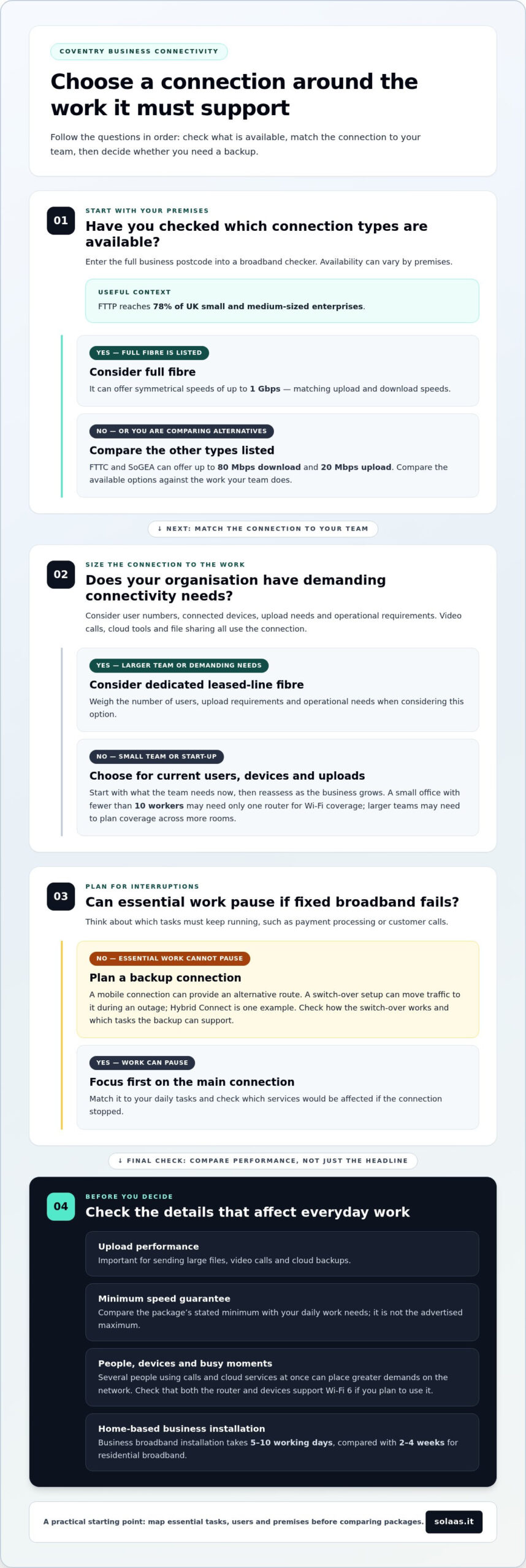
Options include FTTC, SoGEA, full fibre and dedicated leased lines. FTTC and SoGEA offer up to 80 Mbps download and 20 Mbps upload; full fibre can offer symmetrical speeds up to 1 Gbps. Check availability by entering the full business postcode into a broadband checker and comparing the connection types listed. FTTP reaches 78% of UK small and medium-sized enterprises.
Fixed broadband for businesses
Fixed broadband connects premises through a line, supporting email, secure cloud work and video calls. Start-ups can choose a package for current users, devices and upload needs, then reassess as their team grows. Larger organisations may consider dedicated leased-line fibre for demanding connectivity, weighing user numbers, upload needs and operational requirements. A broadband and calls bundle may also suit businesses planning their communications together.
Business and residential broadband
Business and residential packages may use similar networks, but serve different needs. Business internet used at home is provided at the same service level as a business service, rather than as a residential package. Installation takes 5-10 working days for business broadband, compared with 2-4 weeks for residential broadband. Choose based on work such as customer contact and seamless video calls, not household streaming.
Speeds and minimum speed guarantee
Speeds are measured in Mbps: download receives files, while upload supports sending files and video calls. Full fibre can offer symmetrical speeds up to 1 Gbps, matching upload and download. A minimum speed guarantee is the package’s stated minimum, not its advertised maximum. Compare that figure with your daily work needs; faster speeds may help when several people share calls and cloud services.
Choosing connectivity for different business sizes
Choose connectivity around your team’s work, premises and plans for growth. Count users and connected devices, then consider upload needs and which tasks must continue during an outage. A small office with fewer than 10 workers may need only one router for Wi-Fi coverage, while a larger team may need to plan coverage across more rooms.
As a business grows, more devices and simultaneous calls can place greater demands on its network. Wi-Fi 6 is a newer wireless standard designed to handle multiple connected devices. Check that both the router and the devices support it before building it into your connectivity plan. A static IP address may also be useful for services that rely on a consistent internet address.
Plan a backup connection if essential work can’t pause when fixed broadband fails. A mobile connection can provide an alternative route, and a switch-over setup can move traffic to it during an outage. Hybrid Connect is an example of a backup connectivity option. Compare how the switch-over works and which tasks the backup can support, such as payment processing or customer calls.
When comparing business connectivity options, look at coverage for your premises, upload performance and the work your team relies on. Superfast download speeds alone won’t show whether large file transfers or cloud backups will run smoothly. Map critical applications first, then choose a main connection and backup that fit those needs. For businesses reviewing connectivity alongside other technology needs, business technology services can help frame the decision.
Business internet for home-based businesses
Working from home doesn’t mean household broadband automatically fits business needs. A home-based business may rely on video calls, cloud files, online payments and customer conversations, often at the same time. Employees lose an average of 21 minutes each day waiting for slow internet connections, so consider the work that depends on a steady connection before choosing.
Compare business broadband deals by looking beyond download speed. Check upload performance, data limits, support terms and any minimum speed guarantee. An unlimited package may suit regular calls and large file transfers, but “unlimited” alone doesn’t show how well a connection performs during busy periods. Match the package to real tasks, such as sending large designs or hosting client calls.
Business broadband offers can differ in contract length, included equipment and service terms. List what your work needs, then compare each offer against that list. Choose a solution that supports your current workload and can accommodate changes, such as adding staff or moving more tasks online. Treat the advertised maximum speed as one comparison point, not the sole measure of suitability.
Tax treatment can also depend on your business structure. A UK sole trader may claim the business portion of internet costs as an income tax expense only if they’re not using the £1,000 trading allowance. A limited company may be able to claim the full cost when the contract is specifically for business use, is in the company’s name and the company pays directly.
If you’d like to discuss how home connectivity affects your business, contact us about your requirements.
SolaaS Limited: Managed IT Services
SolaaS helps businesses align connectivity and technology support with the way they work. Its Managed IT Services support organisations that need help managing their IT, while Business Internet Connectivity addresses the connection needs of workplaces and home-based businesses.
For teams that rely on phone calls or customer conversations, Cloud Telephony Solutions and a Contact Centre Platform can be part of a wider communications setup. Discussing these needs together helps you consider how internet access, IT support and communications fit as your business changes.
If you have questions about how these options affect your business, contact SolaaS Limited.
Make your next connectivity decision count
A practical business internet starting point is to map which work depends on reliable access, then identify what your connection needs to support as the business develops. This gives you a clear basis for planning connectivity alongside how your team communicates and serves customers.
SolaaS offers Managed IT Services, Cloud Telephony Solutions and a Contact Centre Platform, alongside Business Internet Connectivity. These services bring connectivity, IT support and customer communications into the same planning conversation.
If you have questions about how your connectivity choices affect your business, contact SolaaS Limited about your business internet needs. Take the next step with a clearer view of what your business needs to keep moving.
Frequently Asked Questions
What is business internet?
Business internet supports an organisation’s online work, such as taking payments, sharing files or accessing cloud tools. To find a useful business internet starting point, list the tasks that would be disrupted if the connection slowed or failed. A Coventry accountant, for example, may prioritise access to online records and dependable video meetings.
What internet speed does a new business need in the UK?
The right speed depends on how many people are online at once and what they’re doing. For a new firm, a business internet starting point is to note whether work involves email, large uploads, video meetings or cloud applications. Consider the busiest working periods, not just quiet moments, and assess upload performance as well as download speed.
How much does business broadband cost in the UK?
Business broadband costs depend on the connection type, speed, contract terms and installation needs at the premises. Compare the total package and its terms, rather than judging by one advertised figure. A connection requiring dedicated infrastructure may involve different costs from a standard broadband service. For a tailored quote, the price depends on your business requirements and is provided after a request.
Which UK business internet providers offer the best plans?
There isn’t one best plan for every organisation, because coverage and work needs vary by address. Compare service terms, support arrangements, upload performance and any minimum speed guarantee against your priorities. SolaaS offers Business Internet Connectivity for businesses in Coventry, Leicester, Warwick and Leamington. Choose a plan that fits your work today and can accommodate future needs.
What is the difference between business and home broadband?
The main difference is the package’s purpose and service level, not simply whether it’s installed at home or an office. A home-based business may need connectivity for customer calls, online services and work files alongside household use. Review the package terms and your business needs, and contact us about how connectivity affects your business.

Article by
René Wheeler
René Wheeler is Managing Director of SolaaS, bringing over three decades of experience in IT and telecoms. He is a strong advocate for transparency and flexibility, championing monthly contract models that allow businesses to stay agile and in control of their technology. His approach challenges traditional industry practices and puts client outcomes first